The mean() method computes the arithmetic mean of a given set of numbers along the specified axis.
mean() Syntax
The syntax of mean() is:
numpy.mean(array, axis=None, dtype=None, out=None, keepdims=<no value>, where=<no value>)
mean() Arguments
The mean() method takes the following arguments:
array-array containing numbers whose mean is desired (can bearray_like)axis(optional)- axis or axes along which the means are computed(intortuple of int)dtype(optional)- the datatype to use in the calculation of mean(datatype)out(optional)- the location where the output is stored(ndarray)keepdims(optional)- specifies whether to preserve the shape of original array(bool)where(optional)- elements to include in the mean(array of bool)
Notes:
The default values of:
axis = None, i.e. array is flattened and the mean of the entire array is taken.dtype = None, i.e. in the case of integers,floatis taken otherwise mean is of the same datatype as the elements.- By default,
keepdimsandwherewill not be passed.
mean() Return Value
The mean() method returns the arithmetic mean of the array.
Example 1: Find the Mean of a ndArray
Output
Mean of the entire array: 4.5

Mean across axis 0:
[[3. 4.]
 [5. 6.]]

Mean across axis 0 and 1 [4. 5.]
When no axis parameter is specified, np.mean(array1) calculates the mean of the entire array by averaging all the elements.
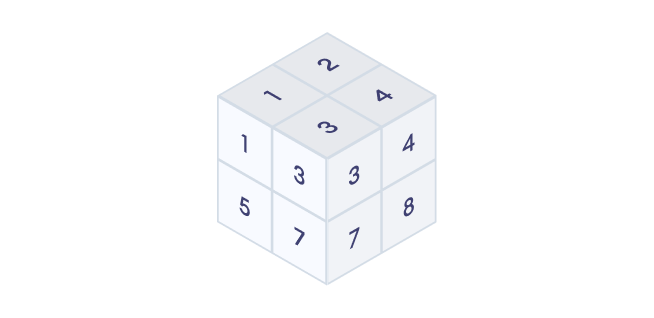
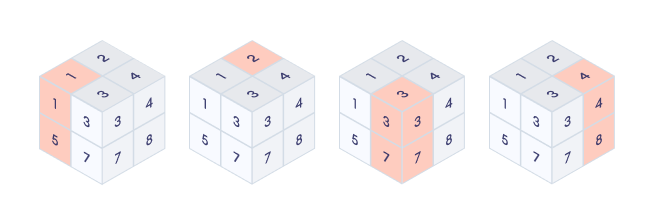
When calculating the mean along axis=0, it gives the mean across the rows for each column (slice-wise).
When calculating the mean along axis=(0, 1), it gives the mean simultaneously across the rows and columns. The resulting array is a 1D array with the mean of all elements in the entire 2D array.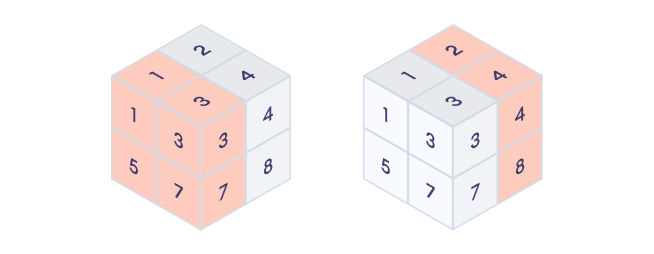
Example 2: Specify Datatype of Mean of a ndArray
We can use dtype argument to specify the data type of the output array.
Output
Float mean: 3.5
Integer mean: 3
Note: Using a lower precision dtype, such as int, can lead to a loss of accuracy.
Example 3: Using Optional keepdims Argument
If keepdims is set to True, the dimension of the original array is preserved and passed to the resultant mean array.
Output
Original Array Dimension: 2
Mean without keepdims: [2.5 3.5 4.5] Dimension 1
Mean with keepdims: [[2.5 3.5 4.5]] Dimensions 2
Example 4: Use where to Find the Mean of Filtered Array
We can filter the array using the where argument and find the mean of the filtered array.
Output
Mean of entire array: 3.5
Mean of only even elements: 4.0
Mean of  numbers greater than 3: 5.0
Example 5: Use out to Store the Result in Desired Location
The out parameter allows to specify an output array where the result will be stored.
Output
Mean: [2.5 3.5 4.5]