In Python, lists are used to store multiple data at once.
Suppose we need to record the ages of 5 students. Instead of creating 5 separate variables, we can simply create a list.

Create a List
We create a list by placing elements inside [], separated by commas. For example,
Here, we have created a list named ages with 3 integer items.
A list can
- store elements of different types (integer, float, string, etc.)
- store duplicate elements
# list with elements of different data types
list1 = [1, "Hello", 3.4]

# list with duplicate elements
list1 = [1, "Hello", 3.4, "Hello", 1]

# empty list
list3 = []
Note: We can also create a list using the list() constructor.
Access List Elements
In Python, lists are ordered and each item in a list is associated with a number. The number is known as a list index.
The index of the first element is 0, second element is 1 and so on. For example,
In the above example, we have created a list named languages.

Here, we can see each list item is associated with the index number. And we have used the index number to access the items.
Remember: The list index always starts with 0. Hence, the first element of a list is present at index 0, not 1.
Negative Indexing in Python
Python allows negative indexing for its sequences. The index of -1 refers to the last item, -2 to the second last item and so on.
Let's see an example,
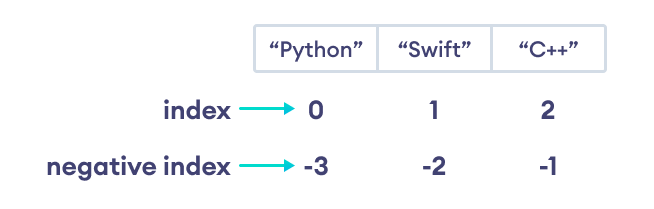
Note: If the specified index does not exist in a list, Python throws the IndexError exception.
Slicing of a List
In Python, it is possible to access a portion of a list using the slicing operator :. For example,
Output
['o', 'g', 'r']
['a', 'm', 'i', 'z']
['p', 'r', 'o', 'g', 'r', 'a', 'm', 'i', 'z']
Here,
my_list[2:5]returns a list with items from index 2 to index 4.my_list[5:]returns a list with items from index 5 to the end.my_list[:]returns all list items
Note: When we slice lists, the start index is inclusive, but the end index is exclusive.
Add Elements to a List
Lists are mutable (changeable). Meaning we can add and remove elements from a list.
Python list provides different methods to add items to a list.
1. Using append()
The append() method adds an item at the end of the list. For example,
Output
Before Append: [21, 34, 54, 12]
After Append: [21, 34, 54, 12, 32]
In the above example, we have created a list named numbers. Notice the line
numbers.append(32)
Here, append() adds 32 at the end of the array.
2. Using extend()
We use the extend() method to add all the items of an iterable (list, tuple, string, dictionary, etc.) to the end of the list. For example,
Output
List after append: [1, 3, 5, 4, 6, 8]
Here, numbers.extend(even_numbers) adds all the elements of even_numbers to the numbers list.
3. Using insert()
We use the insert() method to add an element at the specified index.
Change List Items
Python lists are mutable. Meaning lists are changeable. And we can change items of a list by assigning new values using the = operator. For example,
Here, initially the value at index 3 is 'C++'. We then changed the value to 'C' using
languages[2] = 'C'
Remove an Item From a List
1. Using del Statement
In Python we can use the del statement to remove one or more items from a list. For example,
2. Using remove()
We can also use the remove() method to delete a list item. For example,
Here, languages.remove('Python') removes 'Python' from the languages list.
List Methods
Python has many useful list methods that makes it really easy to work with lists.
| Method | Description |
|---|---|
| append() | add an item to the end of the list |
| extend() | add all the items of an iterable to the end of the list |
| insert() | inserts an item at the specified index |
| remove() | removes item present at the given index |
| pop() | returns and removes item present at the given index |
| clear() | removes all items from the list |
| index() | returns the index of the first matched item |
| count() | returns the count of the specified item in the list |
| sort() | sort the list in ascending/descending order |
| reverse() | reverses the item of the list |
| copy() | returns the shallow copy of the list |
Iterating through a List
We can use a for loop to iterate over the elements of a list. For example,
Output
Python
Swift
C++
Check if an Element Exists in a List
We use the in keyword to check if an item exists in the list or not. For example,
Here,
'C'is not present inlanguages,'C' in languagesevaluates toFalse.'Python'is present inlanguages,'Python' in languagesevaluates toTrue.
List Length
We use the len() function to find the size of a list. For example,
Output
List:  ['Python', 'Swift', 'C++']
Total Elements:  3
List Comprehension
List comprehension is a concise and elegant way to create lists. For example,
Here, this code
numbers = [n**2 for n in range(1, 6)]
is equivalent to
numbers = []

for n in range(1, 6):
    numbers.append(n**2)