The format() method returns a formatted string based on the argument passed.
Example
format() Syntax
The syntax of the String format() method is:
String.format(String str, Object... args)
Here,
format()is a static method. We call theformat()method using the class nameString.stris a string that is to be formatted...in the above code signifies you can pass more than one object toformat().
format() Parameters
The format() method takes two parameters.
- format - a format string
- args - 0 or more arguments
format() Return Value
- returns a formatted string
Example 1: Java String format()
In the above program, notice the code
result = String.format("Language: %s", language);
Here, "Language: %s" is a format string.
%s in the format string is replaced with the content of language. %s is a format specifier.
Similarly, %x is replaced with the hexadecimal value of number in String.format("Number: %x", number).
Format Specifiers
Here are the commonly used format specifiers:
| Specifier | Description |
|---|---|
%b, %B |
"true" or "false" based on the argument |
%s, %S |
a string |
%c, %C |
a Unicode character |
%d |
a decimal integer (used for integers only) |
%o |
an octal integer (used for integers only) |
%x, %X |
a hexadecimal integer (used for integers only) |
%e, %E |
for scientific notation (used for floating-point numbers) |
%f |
for decimal numbers (used for floating-point numbers) |
Example 2: String Formatting of Numbers
Output
n1 in octal: 57
n1 in hexadecimal: 2f
n1 in hexadecimal: 2F
n1 as string: 47
n2 as string: 35.864
n3 in scientific notation: 4.45343e+07
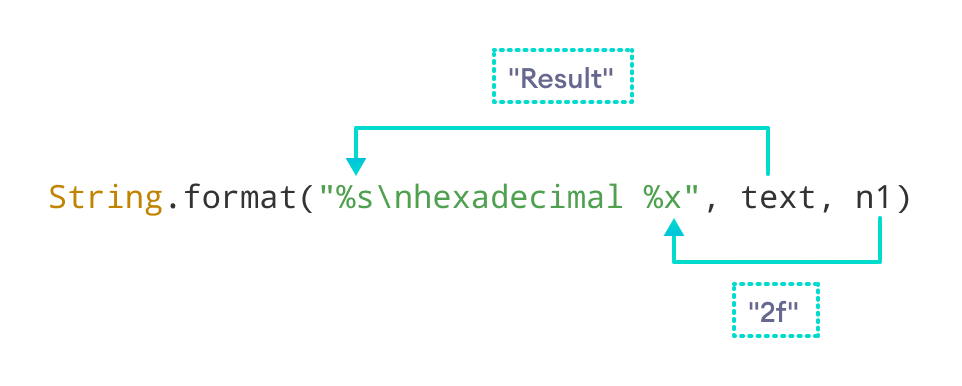
Example 3: String format with multiple format specifiers
You can use more than one format specifier in the format string.
Output
Result
hexadecimal: 2f
Here, %s is replaced with the value of text. Similarly, %o is replaced with the hexadecimal value of n1.
Example 4: Formatting of Decimal Numbers
Output
n1 = -452.533997
n2 = -345.766000
n1 = -452.53
n2 = -345.77
Note: When we format -452.534 using %f, we are getting -452.533997. It is not because of the format() method. Java doesn't return the exact representation of floating-point numbers.
When %.2f format specifier is used, format() gives two numbers after the decimal point.
Example 5: Padding Numbers With Spaces and 0
Example 6: Using 0x and 0 before Hexadecimal and Octal
Java String format() with Locale
The String format() method also has another syntax if you have to work with the specified locale.
String.format(Locale l,
              String format,
              Object... args)
Example 7: Using GERMAN Locale in format()
Output
Number: 8,652,145
Number in German: 8.652.145
Note: In Germany, integers are separated by . instead of ,.