JavaScript Function
A function is a block of code that performs a specific task.
Suppose you need to create a program to create a circle and color it. You can create two functions to solve this problem:
- a function to draw the circle
- a function to color the circle
Dividing a complex problem into smaller chunks makes your program easy to understand and reusable.
JavaScript also has a huge number of inbuilt functions. For example, Math.sqrt() is a function to calculate the square root of a number.
In this tutorial, you will learn about user-defined functions.
Declaring a Function
The syntax to declare a function is:
function nameOfFunction () {
    // function body
}
- A function is declared using the
functionkeyword. - The basic rules of naming a function are similar to naming a variable. It is better to write a descriptive name for your function. For example, if a function is used to add two numbers, you could name the function
addoraddNumbers. - The body of function is written within
{}.
For example,
// declaring a function named greet()
function greet() {
    console.log("Hello there");
}
Calling a Function
In the above program, we have declared a function named greet(). To use that function, we need to call it.
Here's how you can call the above greet() function.
// function call
greet();
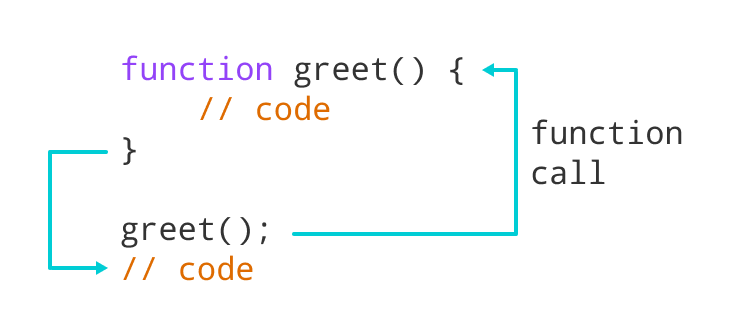
Example 1: Display a Text
Output
Hello there!
Function Parameters
A function can also be declared with parameters. A parameter is a value that is passed when declaring a function.
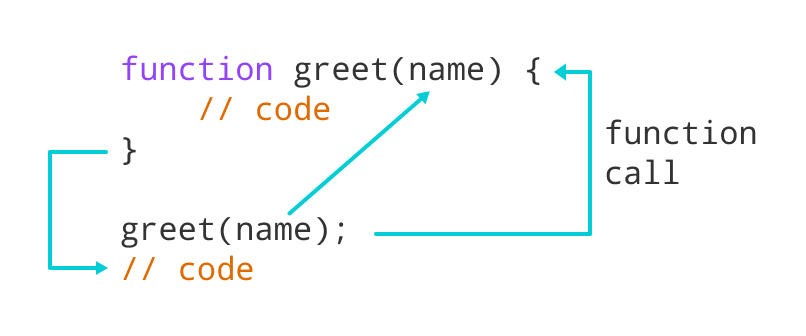
Example 2: Function with Parameters
Output
Enter a name: Simon
Hello Simon :)
In the above program, the greet function is declared with a name parameter. The user is prompted to enter a name. Then when the function is called, an argument is passed into the function.
Note: When a value is passed when declaring a function, it is called parameter. And when the function is called, the value passed is called argument.
Example 3: Add Two Numbers
Output
7
11
In the above program, the add function is used to find the sum of two numbers.
- The function is declared with two parameters
aandb. - The function is called using its name and passing two arguments 3 and 4 in one and 2 and 9 in another.
Notice that you can call a function as many times as you want. You can write one function and then call it multiple times with different arguments.
Function Return
The return statement can be used to return the value to a function call.
The return statement denotes that the function has ended. Any code after return is not executed.
If nothing is returned, the function returns an undefined value.
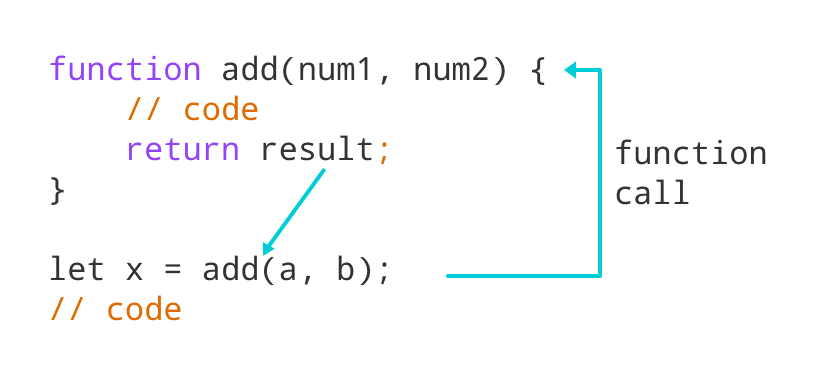
Example 4: Sum of Two Numbers
Output
Enter first number: 3.4
Enter second number: 4
The sum is 7.4
In the above program, the sum of the numbers is returned by the function using the return statement. And that value is stored in the result variable.
Benefits of Using a Function
- Function makes the code reusable. You can declare it once and use it multiple times.
- Function makes the program easier as each small task is divided into a function.
- Function increases readability.
Function Expressions
In Javascript, functions can also be defined as expressions. For example,
Output
16
9
In the above program, variable x is used to store the function. Here the function is treated as an expression. And the function is called using the variable name.
The function above is called an anonymous function.
Note: In ES2015, JavaScript expressions are written as arrow functions. You will learn about them in later tutorials.