A multidimensional array is an array that contains another array. For example,
// multidimensional array
const data = [[1, 2, 3], [1, 3, 4], [4, 5, 6]];
Create a Multidimensional Array
Here is how you can create multidimensional arrays in JavaScript.
Example 1
let studentsData = [['Jack', 24], ['Sara', 23], ['Peter', 24]];
Example 2
let student1 = ['Jack', 24];
let student2 = ['Sara', 23];
let student3 = ['Peter', 24];

// multidimensional array
let studentsData = [student1, student2, student3];
Here, both example 1 and example 2 creates a multidimensional array with the same data.
Access Elements of an Array
You can access the elements of a multidimensional array using indices (0, 1, 2 …). For example,
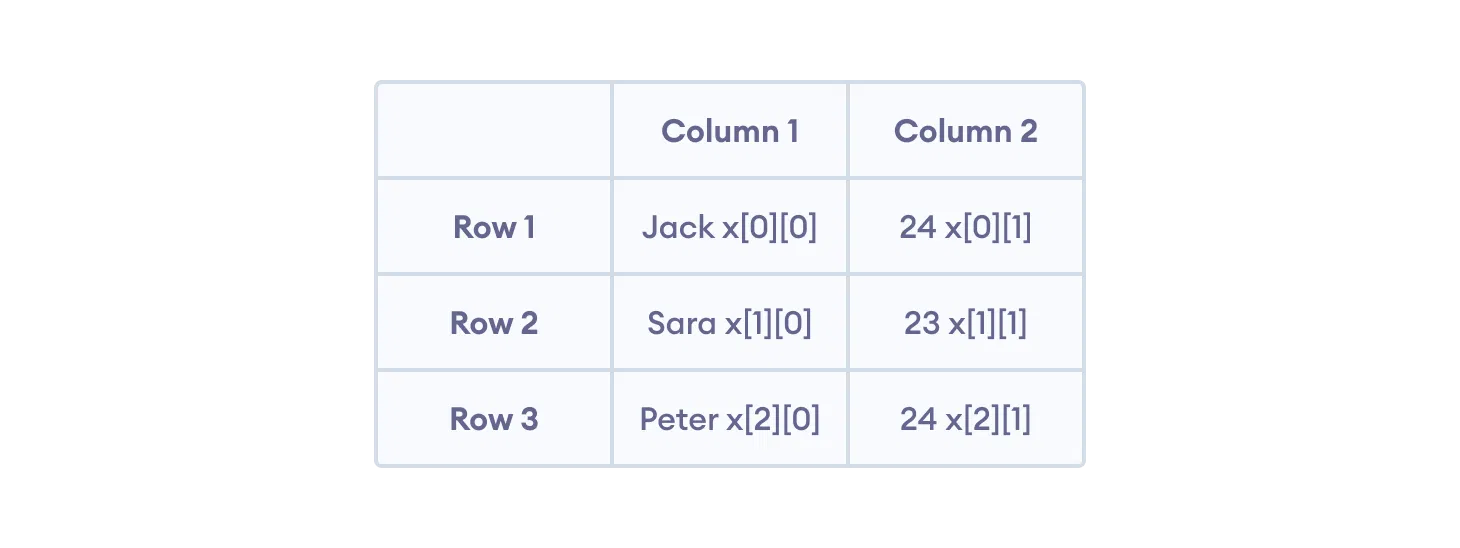
You can think of a multidimensional array (in this case, x), as a table with 3 rows and 2 columns.
Add an Element to a Multidimensional Array
You can use the Array's push() method or an indexing notation to add elements to a multidimensional array.
Adding Element to the Outer Array
Adding Element to the Inner Array
You can also use the Array's splice() method to add an element at a specified index. For example,
Remove an Element from a Multidimensional Array
You can use the Array's pop() method to remove the element from a multidimensional array. For example,
Remove Element from Outer Array
Remove Element from Inner Array
You can also use the splice() method to remove an element at a specified index. For example,
Iterating over Multidimensional Array
You can iterate over a multidimensional array using the Array's forEach() method to iterate over the multidimensional array. For example,
Output
Jack
24
Sara
23
The first forEach() method is used to iterate over the outer array elements and the second forEach() is used to iterate over the inner array elements.
You can also use the for...of loop to iterate over the multidimensional array. For example,
You can also use the for loop to iterate over a multidimensional array. For example,