In computer programming, the continue statement is used to skip the current iteration of the loop and the control of the program goes to the next iteration.
The syntax of the continue statement is:
continue;
Before you learn about the continue statement, make sure you know about,
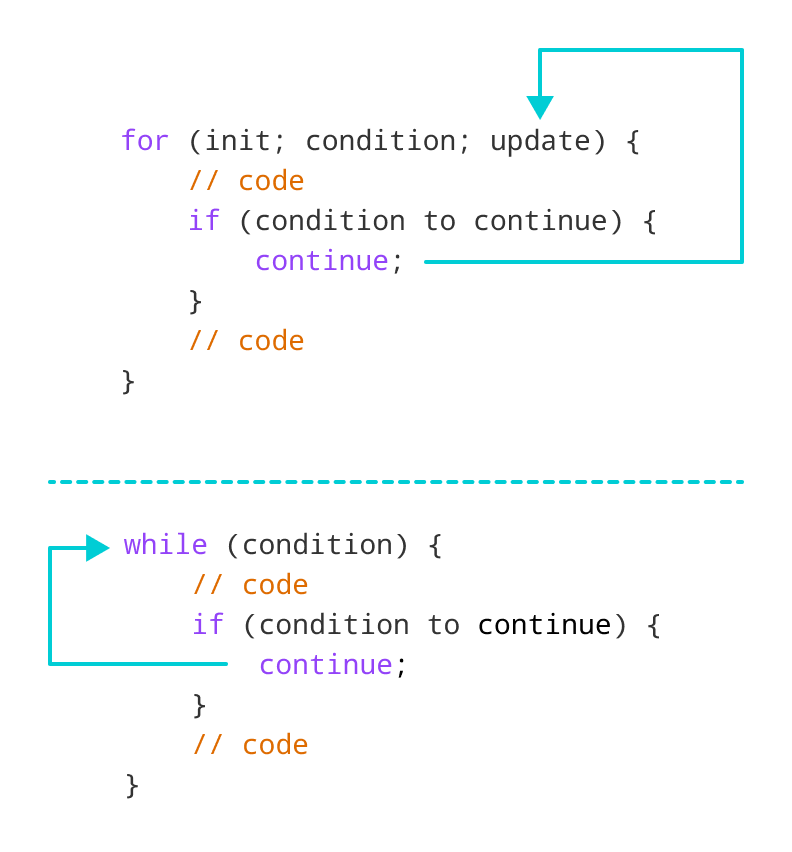
Working of C++ continue Statement
Example 1: continue with for loop
In a for loop, continue skips the current iteration and the control flow jumps to the update expression.
Output
1
2
4
5
In the above program, we have used the the for loop to print the value of i in each iteration. Here, notice the code,
if (i == 3) {
    continue;
}
This means
- When i is equal to
3, thecontinuestatement skips the current iteration and starts the next iteration - Then, i becomes
4, and theconditionis evaluated again. - Hence,
4and5are printed in the next two iterations.
Note: The continue statement is almost always used with decision-making statements.
Example 2: continue with while loop
In a while loop, continue skips the current iteration and control flow of the program jumps back to the while condition.
Output
Enter a number: 12
Enter a number: 0
Enter a number: 2
Enter a number: 30
Enter a number: 50
Enter a number: 56
The number is greater than 50 and won't be calculated.
Enter a number: 5
Enter a number: -3
The sum is 99
In the above program, the user enters a number. The while loop is used to print the total sum of positive numbers entered by the user, as long as the numbers entered are not greater than 50.
Notice the use of the continue statement.
 if (number > 50){
    continue;
}
- When the user enters a number greater than
50, thecontinuestatement skips the current iteration. Then the control flow of the program goes to theconditionofwhileloop. - When the user enters a number less than
0, the loop terminates.
Note: The continue statement works in the same way for the do...while loops.
continue with Nested loop
When continue is used with nested loops, it skips the current iteration of the inner loop. For example,
Output
i = 1, j = 1
i = 1, j = 3
i = 2, j = 1
i = 2, j = 3
i = 3, j = 1
i = 3, j = 3
In the above program, when the continue statement executes, it skips the current iteration in the inner loop. And the control of the program moves to the update expression of the inner loop.
Hence, the value of j = 2 is never displayed in the output.
Note: The break statement terminates the loop entirely. However, the continue statement only skips the current iteration.