In computer programming, loops are used to repeat a block of code.
For example, let's say we want to show a message 100 times. Then instead of writing the print statement 100 times, we can use a loop.
That was just a simple example; we can achieve much more efficiency and sophistication in our programs by making effective use of loops.
There are 3 types of loops in C++.
forloopwhileloopdo...whileloop
In the previous tutorial, we learned about the C++ for loop. Here, we are going to learn about while and do...while loops.
C++ while Loop
The syntax of the while loop is:
while (condition) {
    // body of the loop
}
Here,
- A
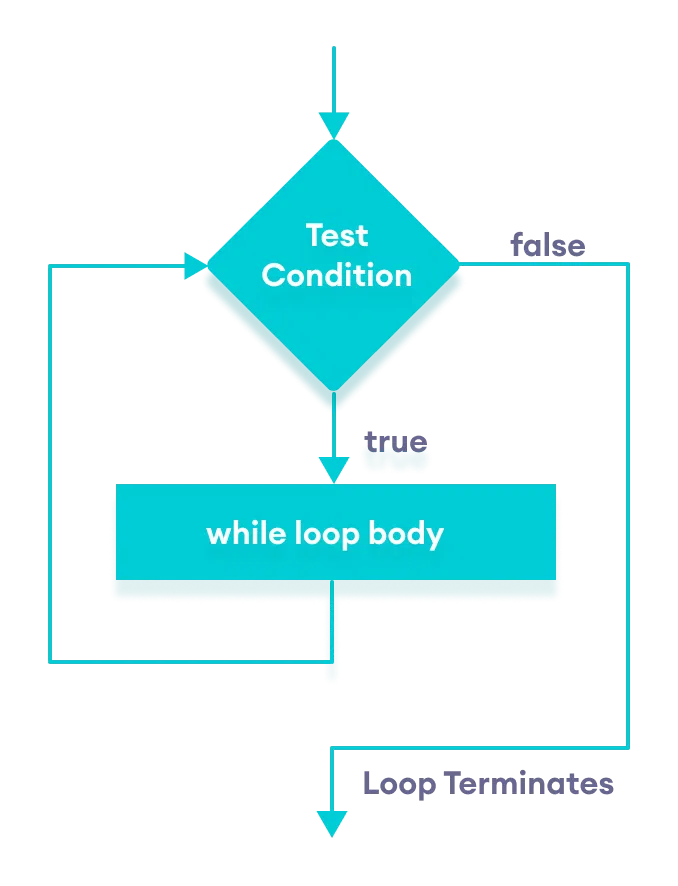
whileloop evaluates thecondition - If the
conditionevaluates totrue, the code inside thewhileloop is executed. - The
conditionis evaluated again. - This process continues until the
conditionisfalse. - When the
conditionevaluates tofalse, the loop terminates.
To learn more about the conditions, visit C++ Relational and Logical Operators.
Flowchart of while Loop
Example 1: Display Numbers from 1 to 5
Output
1 2 3 4 5
Here is how the program works.
| Iteration | Variable | i <= 5 | Action |
|---|---|---|---|
| 1st | i = 1 |
true |
1 is printed and i is increased to 2. |
| 2nd | i = 2 |
true |
2 is printed and i is increased to 3. |
| 3rd | i = 3 |
true |
3 is printed and i is increased to 4 |
| 4th | i = 4 |
true |
4 is printed and i is increased to 5. |
| 5th | i = 5 |
true |
5 is printed and i is increased to 6. |
| 6th | i = 6 |
false |
The loop is terminated |
Example 2: Sum of Positive Numbers Only
Output
Enter a number: 6
Enter a number: 12
Enter a number: 7
Enter a number: 0
Enter a number: -2

The sum is 25
In this program, the user is prompted to enter a number, which is stored in the variable number.
In order to store the sum of the numbers, we declare a variable sum and initialize it to the value of 0.
The while loop continues until the user enters a negative number. During each iteration, the number entered by the user is added to the sum variable.
When the user enters a negative number, the loop terminates. Finally, the total sum is displayed.
C++ do...while Loop
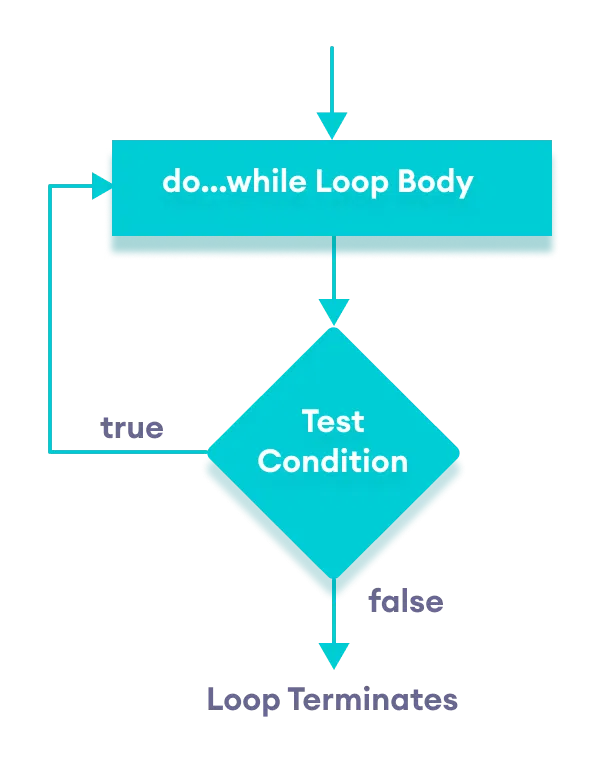
The do...while loop is a variant of the while loop with one important difference: the body of do...while loop is executed once before the condition is checked.
Its syntax is:
do {
   // body of loop;
}
while (condition);
Here,
- The body of the loop is executed at first. Then the
conditionis evaluated. - If the
conditionevaluates totrue, the body of the loop inside thedostatement is executed again. - The
conditionis evaluated once again. - If the
conditionevaluates totrue, the body of the loop inside thedostatement is executed again. - This process continues until the
conditionevaluates tofalse. Then the loop stops.
Flowchart of do...while Loop
Example 3: Display Numbers from 1 to 5
Output
1 2 3 4 5
Here is how the program works.
| Iteration | Variable | i <= 5 | Action |
|---|---|---|---|
i = 1 |
not checked | 1 is printed and i is increased to 2 |
|
| 1st | i = 2 |
true |
2 is printed and i is increased to 3 |
| 2nd | i = 3 |
true |
3 is printed and i is increased to 4 |
| 3rd | i = 4 |
true |
4 is printed and i is increased to 5 |
| 4th | i = 5 |
true |
5 is printed and i is increased to 6 |
| 5th | i = 6 |
false |
The loop is terminated |
Example 4: Sum of Positive Numbers Only
Output 1
Enter a number: 6
Enter a number: 12
Enter a number: 7
Enter a number: 0
Enter a number: -2

The sum is 25
Here, the do...while loop continues until the user enters a negative number. When the number is negative, the loop terminates; the negative number is not added to the sum variable.
Output 2
Enter a number: -6
The sum is 0.
The body of the do...while loop runs only once if the user enters a negative number.
Infinite while loop
If the condition of a loop is always true, the loop runs for infinite times (until the memory is full). For example,
// infinite while loop
while(true) {
    // body of the loop
}
Here is an example of an infinite do...while loop.
// infinite do...while loop

int count = 1;

do {
   // body of loop
}
while(count == 1);
In the above programs, the condition is always true. Hence, the loop body will run for infinite times.
for vs while loops
A for loop is usually used when the number of iterations is known. For example,
// This loop is iterated 5 times
for (int i = 1; i <=5; ++i) {
   // body of the loop
}
Here, we know that the for-loop will be executed 5 times.
However, while and do...while loops are usually used when the number of iterations is unknown. For example,
while (condition) {
    // body of the loop
}
Check out these examples to learn more: