Polymorphism is an important concept of object-oriented programming. It simply means more than one form.
That is, the same entity (method or operator or object) can perform different operations in different scenarios.
Example: Java Polymorphism
Output
Rendering Square...
Rendering Circle...
In the above example, we have created a superclass: Polygon and two subclasses: Square and Circle. Notice the use of the render() method.
The main purpose of the render() method is to render the shape. However, the process of rendering a square is different than the process of rendering a circle.
Hence, the render() method behaves differently in different classes. Or, we can say render() is polymorphic.
Why Polymorphism?
Polymorphism allows us to create consistent code. In the previous example, we can also create different methods: renderSquare() and renderCircle() to render Square and Circle, respectively.
This will work perfectly. However, for every shape, we need to create different methods. It will make our code inconsistent.
To solve this, polymorphism in Java allows us to create a single method render() that will behave differently for different shapes.
Note: The print() method is also an example of polymorphism. It is used to print values of different types like char, int, string, etc.
We can achieve polymorphism in Java using the following ways:
- Method Overriding
- Method Overloading
- Operator Overloading
Java Method Overriding
During inheritance in Java, if the same method is present in both the superclass and the subclass. Then, the method in the subclass overrides the same method in the superclass. This is called method overriding.
In this case, the same method will perform one operation in the superclass and another operation in the subclass. For example,
Example 1: Polymorphism using method overriding
Output:
Java Programming Language
Common English Language
In the above example, we have created a superclass named Language and a subclass named Java. Here, the method displayInfo() is present in both Language and Java.
The use of displayInfo() is to print the information. However, it is printing different information in Language and Java.
Based on the object used to call the method, the corresponding information is printed.
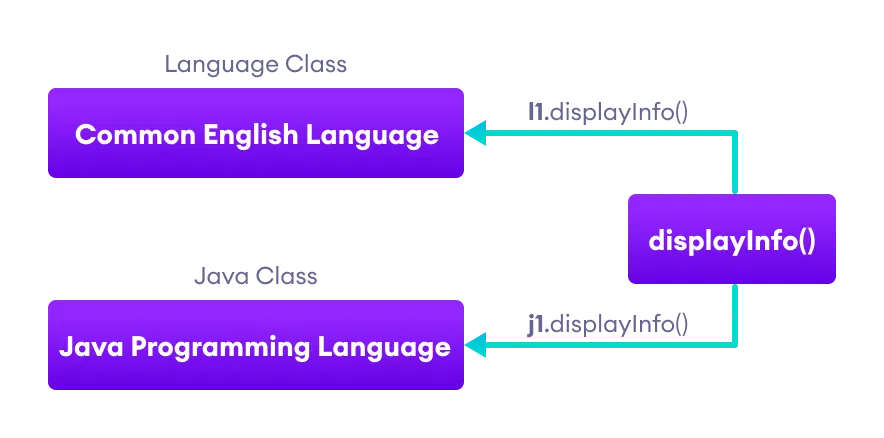
Note: The method that is called is determined during the execution of the program. Hence, method overriding is a run-time polymorphism.
2. Java Method Overloading
In a Java class, we can create methods with the same name if they differ in parameters. For example,
void func() { ... }
void func(int a) { ... }
float func(double a) { ... }
float func(int a, float b) { ... }
This is known as method overloading in Java. Here, the same method will perform different operations based on the parameter.
Example 3: Polymorphism using method overloading
Output:
**********

##########
In the above example, we have created a class named Pattern. The class contains a method named display() that is overloaded.
// method with no arguments
display() {...}

// method with a single char type argument
display(char symbol) {...}
Here, the main function of display() is to print the pattern. However, based on the arguments passed, the method is performing different operations:
- prints a pattern of
*, if no argument is passed or - prints pattern of the parameter, if a single
chartype argument is passed.
Note: The method that is called is determined by the compiler. Hence, it is also known as compile-time polymorphism.
3. Java Operator Overloading
Some operators in Java behave differently with different operands. For example,
+operator is overloaded to perform numeric addition as well as string concatenation, and- operators like
&,|, and!are overloaded for logical and bitwise operations.
Let's see how we can achieve polymorphism using operator overloading.
The + operator is used to add two entities. However, in Java, the + operator performs two operations.
1. When + is used with numbers (integers and floating-point numbers), it performs mathematical addition. For example,
int a = 5;
int b = 6;

// + with numbers
int sum = a + b;  // Output = 11
2. When we use the + operator with strings, it will perform string concatenation (join two strings). For example,
String first = "Java ";
String second = "Programming";

// + with strings
name = first + second;  // Output = Java Programming
Here, we can see that the + operator is overloaded in Java to perform two operations: addition and concatenation.
Note: In languages like C++, we can define operators to work differently for different operands. However, Java doesn't support user-defined operator overloading.
Polymorphic Variables
A variable is called polymorphic if it refers to different values under different conditions.
Object variables (instance variables) represent the behavior of polymorphic variables in Java. It is because object variables of a class can refer to objects of its class as well as objects of its subclasses.
Example: Polymorphic Variables
Output:
I am Programming Language.
I am Object-Oriented Programming Language.
In the above example, we have created an object variable pl of the ProgrammingLanguage class. Here, pl is a polymorphic variable. This is because,
- In statement
pl = new ProgrammingLanguage(), pl refer to the object of the ProgrammingLanguage class. - And, in statement
pl = new Java(), pl refer to the object of the Java class.