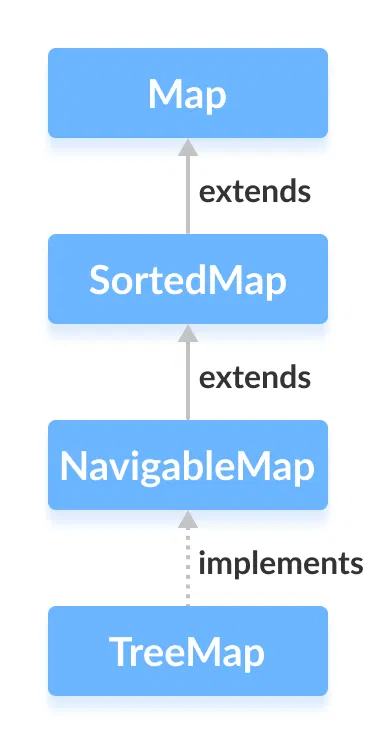
The TreeMap class of the Java collections framework provides the tree data structure implementation.
It implements the NavigableMap interface.
Creating a TreeMap
In order to create a TreeMap, we must import the java.util.TreeMap package first. Once we import the package, here is how we can create a TreeMap in Java.
TreeMap<Key, Value> numbers = new TreeMap<>();
In the above code, we have created a TreeMap named numbers without any arguments. In this case, the elements in TreeMap are sorted naturally (ascending order).
However, we can customize the sorting of elements by using the Comparator interface. We will learn about it later in this tutorial.
Here,
- Key - a unique identifier used to associate each element (value) in a map
- Value - elements associated by keys in a map
Methods of TreeMap
The TreeMap class provides various methods that allow us to perform operations on the map.
Insert Elements to TreeMap
put()- inserts the specified key/value mapping (entry) to the mapputAll()- inserts all the entries from specified map to this mapputIfAbsent()- inserts the specified key/value mapping to the map if the specified key is not present in the map
For example,
Output
TreeMap of even numbers: {Four=4, Six=6, Two=2}
TreeMap of numbers: {Four=4, One=1, Six=6, Two=2}
Access TreeMap Elements
1. Using entrySet(), keySet() and values()
entrySet()- returns a set of all the key/values mapping (entry) of a treemapkeySet()- returns a set of all the keys of a tree mapvalues()- returns a set of all the maps of a tree map
For example,
Output
TreeMap: {One=1, Three=3, Two=2}
Key/Value mappings: [One=1, Three=3, Two=2]
Keys: [One, Three, Two]
Values: [1, 3, 2]
2. Using get() and getOrDefault()
get()- Returns the value associated with the specified key. Returns null if the key is not found.getOrDefault()- Returns the value associated with the specified key. Returns the specified default value if the key is not found.
For example,
Output
TreeMap: {One=1, Three=3, Two=2}
Using get(): 3
Using getOrDefault(): 5
Here, the getOrDefault() method does not find the key Five. Hence it returns the specified default value 5.
Remove TeeMap Elements
remove(key)- returns and removes the entry associated with the specified key from a TreeMapremove(key, value)- removes the entry from the map only if the specified key is associated with the specified value and returns a boolean value
For example,
Output
TreeMap: {One=1, Three=3, Two=2}
Removed value = 2
Is the entry {Three=3} removed? True
Updated TreeMap: {One=1}
Replace TreeMap Elements
replace(key, value)- replaces the value mapped by the specified key with the new valuereplace(key, old, new)- replaces the old value with the new value only if the old value is already associated with the specified keyreplaceAll(function)- replaces each value of the map with the result of the specified function
For example,
Output
Original TreeMap: {First=1, Second=2, Third=3}
TreeMap using replace(): {First=1, Second=22, Third=33}
TreeMap using replaceAll(): {First=3, Second=24, Third=35}
In the above program notice the statement
numbers.replaceAll((key, oldValue) -> oldValue + 2);
Here, we have passed a lambda expression as an argument.
The replaceAll() method accesses all the entries of the map. It then replaces all the elements with the new values (returned from the lambda expression).
Methods for Navigation
Since the TreeMap class implements NavigableMap, it provides various methods to navigate over the elements of the treemap.
1. First and Last Methods
firstKey()- returns the first key of the mapfirstEntry()- returns the key/value mapping of the first key of the maplastKey()- returns the last key of the maplastEntry()- returns the key/value mapping of the last key of the map
For example,
Output
TreeMap: {First=1, Second=2, Third=3}
First Key: First
Last Key: Third
First Entry: First=1
Last Entry: Third=3
2. Ceiling, Floor, Higher and Lower Methods
- higherKey() - Returns the lowest key among those keys that are greater than the specified key.
- higherEntry() - Returns an entry associated with a key that is lowest among all those keys greater than the specified key.
- lowerKey() - Returns the greatest key among all those keys that are less than the specified key.
- lowerEntry() - Returns an entry associated with a key that is greatest among all those keys that are less than the specified key.
- ceilingKey() - Returns the lowest key among those keys that are greater than the specified key. If the key passed as an argument is present in the map, it returns that key.
- ceilingEntry() - Returns an entry associated with a key that is lowest among those keys that are greater than the specified key. It an entry associated with the key passed an argument is present in the map, it returns the entry associated with that key.
- floorKey() - Returns the greatest key among those keys that are less than the specified key. If the key passed as an argument is present, it returns that key.
- floorEntry() - Returns an entry associated with a key that is greatest among those keys that are less than the specified key. If the key passed as argument is present, it returns that key.
For example,
Output
TreeMap: {First=1, Fourth=6, Second=5, Third=4}
Using higherKey(): Second
Using higherEntry(): Second=5

Using lowerKey(): First
Using lowerEntry(): First=1

Using ceilingKey(): Fourth
Using ceilingEntry(): Fourth=6

Using floorkey(): Fourth
Using floorEntry(): Fourth=6
3. pollFirstEntry() and pollLastEntry() Methods
pollFirstEntry()- returns and removes the entry associated with the first key of the mappollLastEntry()- returns and removes the entry associated with the last key of the map
For example,
Output
TreeMap: {First=1, Second=2, Third=3}
Using pollFirstEntry(): First=1
Using pollLastEntry(): Third=3
Updated TreeMap: {Second=2}
4. headMap(), tailMap() and subMap() Methods
headMap(key, booleanValue)
The headMap() method returns all the key/value pairs of a treemap before the specified key (which is passed as an argument).
The booleanValue parameter is optional. Its default value is false.
If true is passed as a booleanValue, the method also includes the key/value pair of the key which is passed as an argument.
For example,
Output
TreeMap: {First=1, Fourth=4, Second=2, Third=3}

Using headMap() Method:
Without boolean value: {First=1}
With boolean value: {First=1, Fourth=4}
tailMap(key, booleanValue)
The tailMap() method returns all the key/value pairs of a treemap starting from the specified key (which is passed as an argument).
The booleanValue is an optional parameter. Its default value is true.
If false is passed as a booleanValue, the method doesn't include the key/value pair of the specified key.
For example,
Output
TreeMap: {First=1, Fourth=4, Second=2, Third=3}

Using tailMap() Method:
Without boolean value: {Second=2, Third=3}
With boolean value: {Third=3}
subMap(k1, bV1, k2, bV2)
The subMap() method returns all the entries associated with keys between k1 and k2 including the entry of k1.
The bV1 and bV2 are optional boolean parameters. The default value of bV1 is true and the default value of bV2 is false.
If false is passed as bV1, the method returns all the entries associated with keys between k1 and k2 without including the entry of k1.
If true is passed as bV2, the method returns all the entries associated with keys between k1 and k2 including the entry of k2.
For example,
Output
TreeMap: {First=1, Fourth=2, Second=2, Third=3}

Using subMap() Method:
Without boolean value: {Fourth=4, Second=2}
With boolean value: {Second=2, Third=3}
Other Methods of TreeMap
| Method | Description |
|---|---|
clone() |
Creates a copy of the TreeMap |
containsKey() |
Searches the TreeMap for the specified key and returns a boolean result |
containsValue() |
Searches the TreeMap for the specified value and returns a boolean result |
size() |
Returns the size of the TreeMap |
clear() |
Removes all the entries from the TreeMap |
TreeMap Comparator
In all the examples above, treemap elements are sorted naturally (in ascending order). However, we can also customize the ordering of keys.
For this, we need to create our own comparator class based on which keys in a treemap are sorted. For example,
Output
TreeMap: {Third=3, Second=2, Fourth=4, First=1}
In the above example, we have created a treemap passing CustomComparator class as an argument.
The CustomComparator class implements the Comparator interface.
We then override the compare() method to sort elements in reverse order.
To learn more, visit Java Comparator (official Java documentation).