C++ List is a STL container that stores elements randomly in unrelated locations. To maintain sequential ordering, every list element includes two links:
- one that points to the previous element
- another that points to the next element
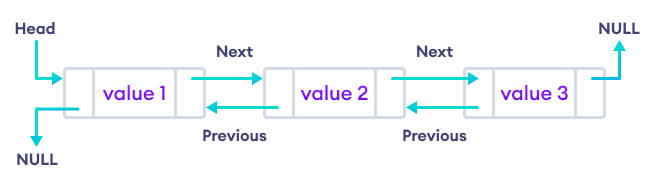
In C++, the STL list implements the doubly-linked list data structure. As a result, we can iterate both forward and backward.
Create C++ STL List
To create a list, we need to include the list header file in our program.
#include<list>
Once we import the header file, we can now declare a list using the following syntax:
std::list<Type> list_name = {value1, value2, ...};
Here,
std::list- declares a STL container of typelist<Type>- the data type of the values to be stored in the listlist_name- a unique name given to the listvalue1, value2, ...- values to be stored in the list
Let's see an example,
// create a list of integer type
std::list<int> numbers = {1, 2, 3, 4, 5};

// create a list of character type
std::list<char> vowels = {'a', 'e', 'i', 'o', 'u'};
Note: We can also include list elements without mentioning the assignment operator. For example,
std::list<int> {1, 2, 3, 4, 5};
Example: C++ STL List
Output
List Elements: 1, 2, 3, 4,
In the above example, we have created a list named numbers with elements: 1, 2, 3, 4. We then used a ranged for loop to print the list elements.
Note: We have used list instead of std::list because we have already defined std namespace using using namespace std;.
Basic operations on List
C++ STL provides various functions that we can use to perform different operations on lists. Let's look at some commonly used list functions to perform the following operations:
- Add elements
- Access elements
- Remove elements
1. Add Elements to a List in C++
We can add values in a list using the following functions:
push_front()- inserts an element to the beginning of the listpush_back()- adds an element to the end of the list
Let's see an example,
Output
Initial List: 1, 2, 3,
Final List: 0, 1, 2, 3, 4,
2. Access List Elements
We can access list elements using the following functions:
front()- returns the first element of the listback()- returns the last element of the list
Let's see an example,
Output
First Element: 1
Last Element: 5
3. Delete List Elements
We can delete list elements using the following functions:
pop_front()- removes the element at the beginning of the listpop_back()- removes the element at the end of the list
Here's an example,
Output
Inital List: 1,  2,  3,  4,  5,
Final List: 2, 3, 4,
Other List Functions in C++
While there are many functions that can be used with lists, we will only look at some of the functions in the table below:
| Function | Description |
|---|---|
reverse() |
Reverses the order of the elements. |
sort() |
Sorts the list elements in a particular order. |
unique() |
Removes consecutive duplicate elements. |
empty() |
Checks whether the list is empty. |
size() |
Returns the number of elements in the list. |
clear() |
Clears all the values from the list |
merge() |
Merges two sorted lists. |
Access elements using an iterator
We can use iterators to access a list element at a specified position. For example,
Output
Second Element: 2
Fourth Element: 4
In the above example,
list<int>::iterator- defines an iterator for a list ofinttypenumbers.begin()- sets the iterator to point to the beginning of the list
Notice that we have used ++itr; repeatedly instead of adding an integer to itr like itr+3;.
This is because iterators are not simple numeric values like regular integers. They point to specific memory locations in the container.
Incrementing an iterator with the ++ operator makes it point to the next element in the container.
To learn more about iterators, visit C++ STL Iterators.
Frequently Asked Questions
We use the insert() function to add an element at a specified position.
The syntax for insert() function for list is:
list_name.insert(iterator, value);
Here,
iterator- points to the position where the value is to be insertedvalue- the actual value that needs to be inserted in the position specified by the iterator
Let's see an example,
Output
Initial List: 1, 2, 3,
Final List: 1, 2, 0, 3,
We use remove() function to remove an element at a specified position.The syntax of remove() function is:
list_name.remove(element);
The remove() function can be used in the following two ways:
- Using Value
- Using Iterator
1. remove() using Value
Output
Initial List: 1, 2, 1, 3, 4, 1,
Final List: 2, 3, 4,
2. remove() using iterator
Output
Initial List: 0, 1, 2, 3, 4, 5, 3,
Final List: 0, 1, 2, 4, 5,
Here, both elements with a value of 3 are deleted, even though we only used remove() function on the fourth element.
This is because the remove() function removes all the elements having the same value as the element pointed by the iterator.